Cloudflare Pages: Deploy Static Sites and Full-Stack Apps for Free
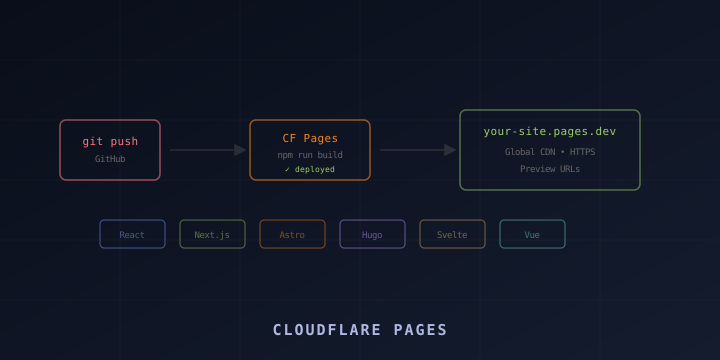
Cloudflare Pages is a JAMstack platform for deploying websites directly from your Git repository. Push code to GitHub or GitLab, and Cloudflare automatically builds and deploys your site to its global CDN — with free SSL, unlimited bandwidth, and preview URLs for every pull request.
It supports every major framework: Astro, Next.js, Nuxt, SvelteKit, Hugo, Gatsby, React, Vue, and plain HTML. This guide walks through setup, configuration, custom domains, environment variables, and Pages Functions for server-side logic.
Why Cloudflare Pages?
- Free tier: Unlimited sites, unlimited bandwidth, 500 builds/month
- Global CDN: Deployed to 300+ Cloudflare edge locations
- Git integration: Auto-deploy on push to GitHub or GitLab
- Preview deployments: Every branch and PR gets a unique preview URL
- Free SSL: Automatic HTTPS for custom domains
- Pages Functions: Server-side logic using Workers (same platform)
- Fast builds: Build times typically under 2 minutes
Compared to alternatives:
| Feature | Cloudflare Pages | Vercel | Netlify |
|---|---|---|---|
| Bandwidth | Unlimited free | 100GB free | 100GB free |
| Builds/month | 500 free | 6000 free | 300 free |
| Edge network | 300+ cities | ~20 regions | CDN |
| Serverless functions | Pages Functions | Edge/Serverless | Functions |
| Custom domains | Unlimited | Unlimited | Unlimited |
Setting Up Cloudflare Pages
Method 1: Connect a Git Repository (Recommended)
- Go to dash.cloudflare.com → Workers & Pages → Create
- Select the Pages tab
- Click Connect to Git
- Authorize Cloudflare to access your GitHub or GitLab account
- Select the repository you want to deploy
- Configure build settings:
| Framework | Build command | Output directory |
|---|---|---|
| Astro | npm run build | dist |
| Next.js | npx @cloudflare/next-on-pages | .vercel/output/static |
| Nuxt | npm run build | .output/public |
| SvelteKit | npm run build | .svelte-kit/cloudflare |
| Hugo | hugo | public |
| React (CRA) | npm run build | build |
| Vue (Vite) | npm run build | dist |
| Gatsby | npm run build | public |
| 11ty | npx @11ty/eleventy | _site |
| Plain HTML | (none) | / or public |
- Click Save and Deploy
Cloudflare will clone your repo, run the build command, and deploy the output directory to its CDN.
Method 2: Direct Upload (No Git)
For static files without a build step:
# Install Wrangler
npm install -g wrangler

# Deploy a directory directly
wrangler pages deploy ./dist

# Or deploy with a project name
wrangler pages deploy ./dist --project-name my-site
Method 3: Wrangler CLI (Git-Free CI/CD)
Use Wrangler in your own CI/CD pipeline:
# Build your site
npm run build

# Deploy to Pages
wrangler pages deploy dist --project-name my-site --branch main
For GitHub Actions:
name: Deploy to Cloudflare Pages
on:
  push:
    branches: [main]

jobs:
  deploy:
    runs-on: ubuntu-latest
    steps:
      - uses: actions/checkout@v4
      - uses: actions/setup-node@v4
        with:
          node-version: 20
      - run: npm ci
      - run: npm run build
      - uses: cloudflare/wrangler-action@v3
        with:
          apiToken: ${{ secrets.CLOUDFLARE_API_TOKEN }}
          accountId: ${{ secrets.CLOUDFLARE_ACCOUNT_ID }}
          command: pages deploy dist --project-name my-site
Preview Deployments
One of Pages’ best features: every branch gets its own preview URL.
- Production:
mainbranch →your-project.pages.dev - Preview:
feature-xbranch →feature-x.your-project.pages.dev - PR previews: Each pull request gets a unique URL with a commit hash
This means you can share preview links with teammates or clients before merging to production.
Branch Deploy Controls
In the Pages dashboard → Settings → Builds & deployments:
- Production branch: Which branch deploys to your main domain (usually
main) - Preview branches: Choose “All non-production branches” or specific branches
- Build watch paths: Only trigger builds when specific directories change
Custom Domains
Add a Custom Domain
- Go to your Pages project → Custom domains
- Click Set up a custom domain
- Enter your domain (e.g.,
www.yourdomain.com) - Cloudflare automatically creates the DNS record
If your domain is already on Cloudflare, the DNS record is created instantly. If not, you’ll need to add a CNAME record pointing to your-project.pages.dev.
Apex Domain (Root Domain)
To use yourdomain.com (without www):
- Your domain must be on Cloudflare DNS
- Add
yourdomain.comas a custom domain - Cloudflare uses CNAME flattening to handle the root domain
Redirects (www to non-www or vice versa)
Create a _redirects file in your output directory:
# Redirect www to non-www
https://www.yourdomain.com/* https://yourdomain.com/:splat 301

# Or non-www to www
https://yourdomain.com/* https://www.yourdomain.com/:splat 301
Environment Variables
Set build-time environment variables in the Pages dashboard or wrangler.toml.
Dashboard
Go to Settings → Environment variables → Add variables for:
- Production: Variables used when building the
mainbranch - Preview: Variables used when building preview branches
Common variables:
NODE_VERSION=20
NPM_FLAGS=--prefer-offline
API_URL=https://api.yourdomain.com
SITE_URL=https://yourdomain.com
In wrangler.toml (for Pages Functions)
[vars]
API_URL = "https://api.yourdomain.com"

[env.preview.vars]
API_URL = "https://staging-api.yourdomain.com"
Secrets
For sensitive values (API keys, tokens):
wrangler pages secret put API_SECRET --project-name my-sitePages Functions (Server-Side Logic)
Pages Functions let you add API endpoints and server-side logic alongside your static site. They run on Cloudflare Workers.
File-Based Routing
Create a functions/ directory in your project root:
my-site/
├── src/
├── public/
├── functions/
│   ├── api/
│   │   ├── hello.ts          # GET/POST /api/hello
│   │   ├── users/
│   │   │   ├── index.ts      # GET/POST /api/users
│   │   │   └── [id].ts       # GET/POST /api/users/:id
│   │   └── [...path].ts      # Catch-all /api/*
│   └── _middleware.ts         # Runs on all requests
└── package.json
Basic Function
// functions/api/hello.ts
export const onRequestGet: PagesFunction = async (context) => {
  return Response.json({ message: "Hello from Pages Functions!" });
};

export const onRequestPost: PagesFunction = async (context) => {
  const body = await context.request.json();
  return Response.json({ received: body });
};
Dynamic Routes
// functions/api/users/[id].ts
export const onRequestGet: PagesFunction = async (context) => {
  const userId = context.params.id;
  return Response.json({ userId, name: "John Doe" });
};
Middleware
// functions/_middleware.ts
export const onRequest: PagesFunction = async (context) => {
  // Run before the page/function handler
  console.log("Request:", context.request.url);

  // Add CORS headers
  const response = await context.next();
  response.headers.set("Access-Control-Allow-Origin", "*");

  return response;
};
Using KV, R2, and D1
Bind storage in wrangler.toml:
[[kv_namespaces]]
binding = "KV"
id = "your-kv-id"

[[r2_buckets]]
binding = "BUCKET"
bucket_name = "my-bucket"

[[d1_databases]]
binding = "DB"
database_name = "my-db"
database_id = "your-db-id"
Access in functions:
// functions/api/data.ts
interface Env {
  KV: KVNamespace;
  BUCKET: R2Bucket;
  DB: D1Database;
}

export const onRequestGet: PagesFunction<Env> = async (context) => {
  const value = await context.env.KV.get("mykey");
  return Response.json({ value });
};
Headers and Redirects
Custom Headers (_headers file)
Create _headers in your output directory:
# All pages
/*
  X-Frame-Options: DENY
  X-Content-Type-Options: nosniff
  Referrer-Policy: strict-origin-when-cross-origin

# Cache static assets
/assets/*
  Cache-Control: public, max-age=31536000, immutable

# Security headers for HTML
/*.html
  Content-Security-Policy: default-src 'self'
Redirects (_redirects file)
Create _redirects in your output directory:
# Simple redirect
/old-page /new-page 301

# Redirect with splat
/blog/old/* /blog/new/:splat 301

# Proxy (invisible rewrite)
/api/* https://api.backend.com/:splat 200

# Country-based redirect
/ /en 302 Country=us,gb
/ /de 302 Country=de,at
Build Configuration
Specifying Node Version
In the dashboard environment variables:
NODE_VERSION=20Or use a .node-version file:
20Build Caching
Pages caches node_modules between builds. To force a clean build, go to Settings → Builds → Clear build cache.
Monorepo Support
If your site is in a subdirectory:
- Root directory: Set to
packages/my-site(or wherever your site lives) - Build command:
npm run build - Output directory:
dist(relative to root directory)
Wrangler CLI Commands for Pages
# Create a new Pages project
wrangler pages project create my-site

# Deploy a directory
wrangler pages deploy ./dist --project-name my-site

# Deploy to a specific branch
wrangler pages deploy ./dist --project-name my-site --branch staging

# List deployments
wrangler pages deployment list --project-name my-site

# Tail live logs (for Pages Functions)
wrangler pages deployment tail --project-name my-site

# Delete a project
wrangler pages project delete my-site
Summary
Cloudflare Pages is the simplest way to deploy a website with a Git-push workflow. You get global CDN distribution, free SSL, preview deployments, and server-side logic with Pages Functions — all on a generous free tier.
Key resources:
- Documentation: https://developers.cloudflare.com/pages/
- Framework guides: https://developers.cloudflare.com/pages/framework-guide/
- Pages Functions: https://developers.cloudflare.com/pages/functions/
- Limits: https://developers.cloudflare.com/pages/platform/limits/
Connect your repo, configure the build, and your site is live globally in minutes.